
If you are moving goods into the EU, you need to submit an ICS2 Entry Summary Declaration before the goods arrive. This guide walks through the process step by step using ENS Ready, a self-serve platform for submitting GB ENS and EU ICS2 declarations.
What Is an ICS2 Entry Summary Declaration?
ICS2 (Import Control System 2) is the EU's pre-arrival safety and security programme. An Entry Summary Declaration (ENS) submitted under ICS2 gives EU customs authorities advance information about a shipment before it enters the EU. EU ICS2 declarations on ENS Ready are always accompanied movements, meaning the driver travels with the vehicle.
Who Needs to Submit One
Freight forwarders, hauliers, and customs brokers moving goods into the EU by road need an ICS2 declaration submitted before the vehicle crosses. This applies to any accompanied movement entering the EU where a pre-arrival safety and security declaration is required.
Step 1: Fill in Transport Details

The Transport Details section captures how and when the vehicle is moving. You will need:
- Custom Reference: your own reference number for the movement
- Vehicle Nationality: selected from a country list
- Unit ID: the identifier for the trailer or unit
- Type of Means of Transport: selected from a vehicle type list
- Departure Port: selected from a port list
- Expected Date of Departure and Expected Time of Departure
- Arrival Port: selected from a port list
- Expected Date of Arrival and Expected Time of Arrival
- Country of Routing
Since ICS2 declarations are always accompanied on ENS Ready, there is no accompanied/unaccompanied toggle to worry about here: just fill in the transport fields directly.
Step 2: Add Consignor/Sender Details
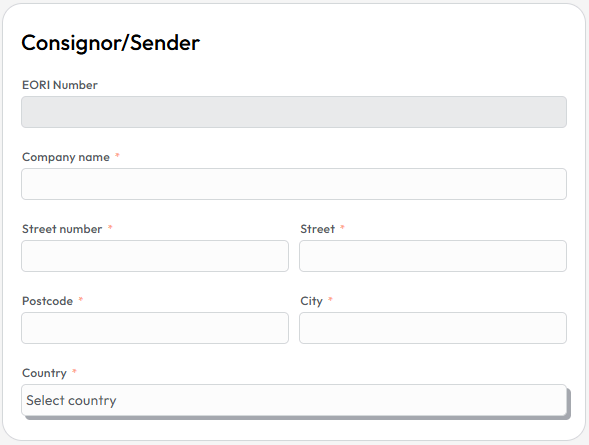
This section covers who is sending the goods. Fields include:
- Company name
- Street number and Street
- Postcode and City
- Country
The EORI number is not required for the consignor, so ENS Ready has disabled the field.
Step 3: Add Consignee/Receiver Details
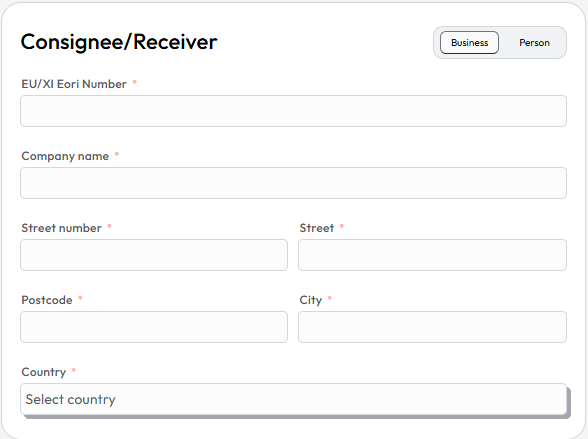
The Consignee/Receiver section first asks you to select whether the receiver is a Business or a Person, then captures:
- EU/XI EORI Number of the consignee
- Company name
- Street number and Street
- Postcode and City
- Country
Choosing Business or Person correctly matters, since it changes how the receiver is identified in the declaration. If Person is selected, the EORI number is not required.
Step 4: Enter Carrier Details
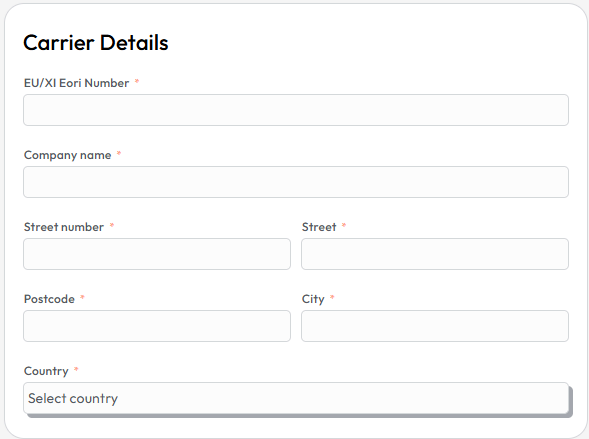
The Carrier Details panel captures the party responsible for transporting the goods:
- EU/XI EORI Number
- Company name
- Street number and Street
- Postcode and City
- Country
Even if the carrier is based in the UK, they are required to have an EU EORI number. Check our guide on how to apply for one.
Step 5: Complete Consignment Details

Consignment Details cover the shipment as a whole:
- ENS Requestor EU/XI EORI: the EORI of the party requesting the declaration
- Country of Delivery
- Delivery Town/City
Step 6: Add Goods Details
The Goods section is where you list what is actually being moved. For each line you need:
- Description: a clear description of the goods. Make sure that you are not using any of the stop words.
- 6-Digit Commodity Code
- Gross Mass
- Hazardous flag, if applicable
- Type of Package: selected from a package type list
- Number of Packages
- Shipping Marks
If you have several goods lines, use the Import CSV table option to bulk-upload the data instead of entering each line by hand. Otherwise, use Add Good to add lines one at a time.
Note that ICS2 requires a 6-digit commodity code for each goods line, unlike GB ENS, so have these ready before you start filling in the form.
Step 7: Submit Your Declaration
Once every section is complete, submit the declaration for processing. ENS Ready sends the declaration through to the relevant EU customs system so it can be matched against the actual crossing.
Frequently Asked Questions
Is an EU ICS2 declaration always accompanied? On ENS Ready, yes. ICS2 declarations are always treated as accompanied movements, meaning the driver travels with the vehicle. It is the ferry operator's responsibility to submit the ICS2 declaration for unaccompanied movements.
Do I need a commodity code for an ICS2 declaration? Yes. Each goods line requires a 6-digit commodity code, in addition to a description, gross mass, and package details.
Can I submit goods data in bulk on ENS Ready for ICS2? Yes. ENS Ready supports importing a CSV table of goods, which is useful for consignments with multiple goods lines.
What EORI numbers do I need for an ICS2 declaration? You need an EU/XI EORI number for the consignee (unless the receiver is a person) and the carrier, and an EU/XI EORI for the ENS requestor in the consignment details. The consignor doesn't need one.
Do I need to submit an ICS2 declaration for empty vehicles? If you are travelling under a transport contract (e.g. someone is paying for the movement), you will need to submit an ICS2 declaration for empty movements. See our guide on how to submit an ICS2 EU ENS for an empty vehicle.
Submit Your ICS2 Declaration
ENS Ready is built for freight forwarders, hauliers, and customs brokers who need a straightforward way to submit GB ENS and EU ICS2 declarations. Try it at ensready.com to submit your next declaration.
Questions
Is an EU ICS2 declaration always accompanied?
On ENS Ready, yes. ICS2 declarations are always treated as accompanied movements, meaning the driver travels with the vehicle. It is the ferry operator's responsibility to submit the ICS2 declaration for unaccompanied movements.
Do I need a commodity code for an ICS2 declaration?
Yes. Each goods line requires a 6-digit commodity code, in addition to a description, gross mass, and package details.
Can I submit goods data in bulk on ENS Ready for ICS2?
Yes. ENS Ready supports importing a CSV table of goods, which is useful for consignments with multiple goods lines.
Do I need to submit an ICS2 declaration for empty vehicles?
If you are travelling under a transport contract (e.g. someone is paying for the movement), you will need to submit an ICS2 declaration for empty movements.